

Instructions
Click a topic below. Screenshots are the original phone UI images from ktimesailing.com.
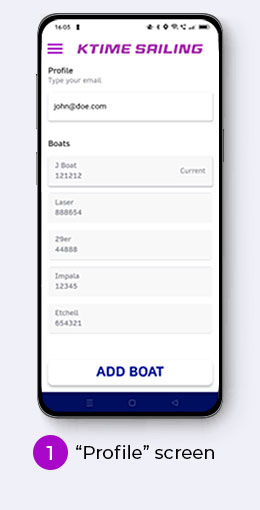
Profile
- Choose one of your existing boats.
- Or add another boat — enter boat type and sail number.
- This moves you to the Sailing screen.
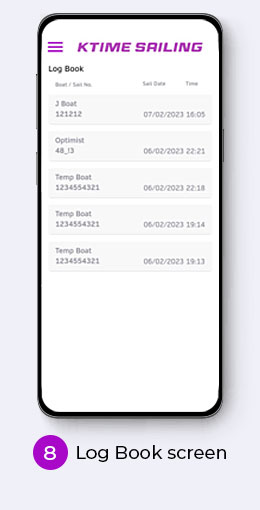
- That boat and sail number are linked to your Individual Stats and shown in your Log Book.
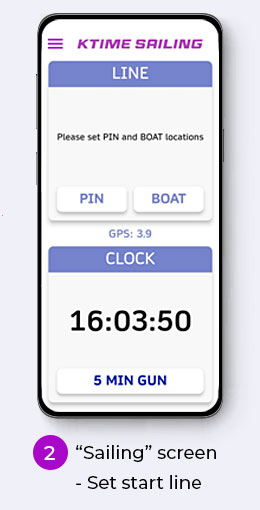
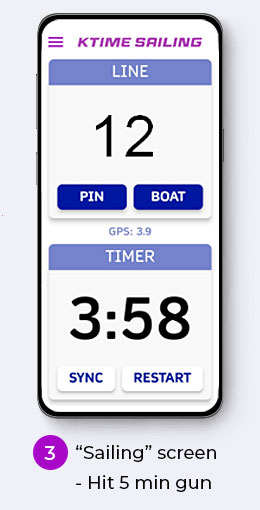
Start Sailing
Racing
- Sail to the pin end of the start line and hit PIN.
- Sail to the committee boat end and hit BOAT.
- Live distance to the line will be shown.
- Hit 5 MIN GUN to start tracking.
- Speed and heading appear when the timer reaches zero.
Cruising
- Hit 5 MIN GUN to start tracking.
- Speed and heading appear when the timer reaches zero.
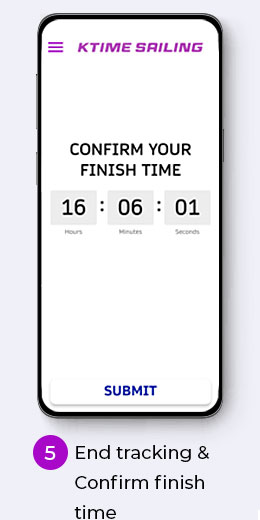
End Tracking
- Hit END TRACKING.
- Confirm your finish time.
- See your Individual Stats — saved automatically to your Log Book.
Individual Stats
- Top and average speed — from when the timer hits zero to your finish time.
- Speed off the line — average speed for two minutes after the timer hits zero.
- Distance to line at start — how far behind the line you were when the timer hit zero.
- Distance sailed — total distance from gun to finish.
- GPS accuracy — average accuracy over that period.
- Use Share to download location data with timestamps (CSV or GPX).
Other Functionality
- If GPS accuracy is worse than 10 m, the app background turns red.
- If you are over the start line, distance to line turns orange and shows a minus sign.
- Deleting all data from the in-app instructions page permanently deletes data held by KTime Sailing.
- Deleting one sail from the Log Book removes it only on the phone. With a validated profile email you can restore sails after reinstall by entering and validating that email again.